Home / JARVIS
Free download · macOS · Windows
Say “Hey Jarvis.” It listens.
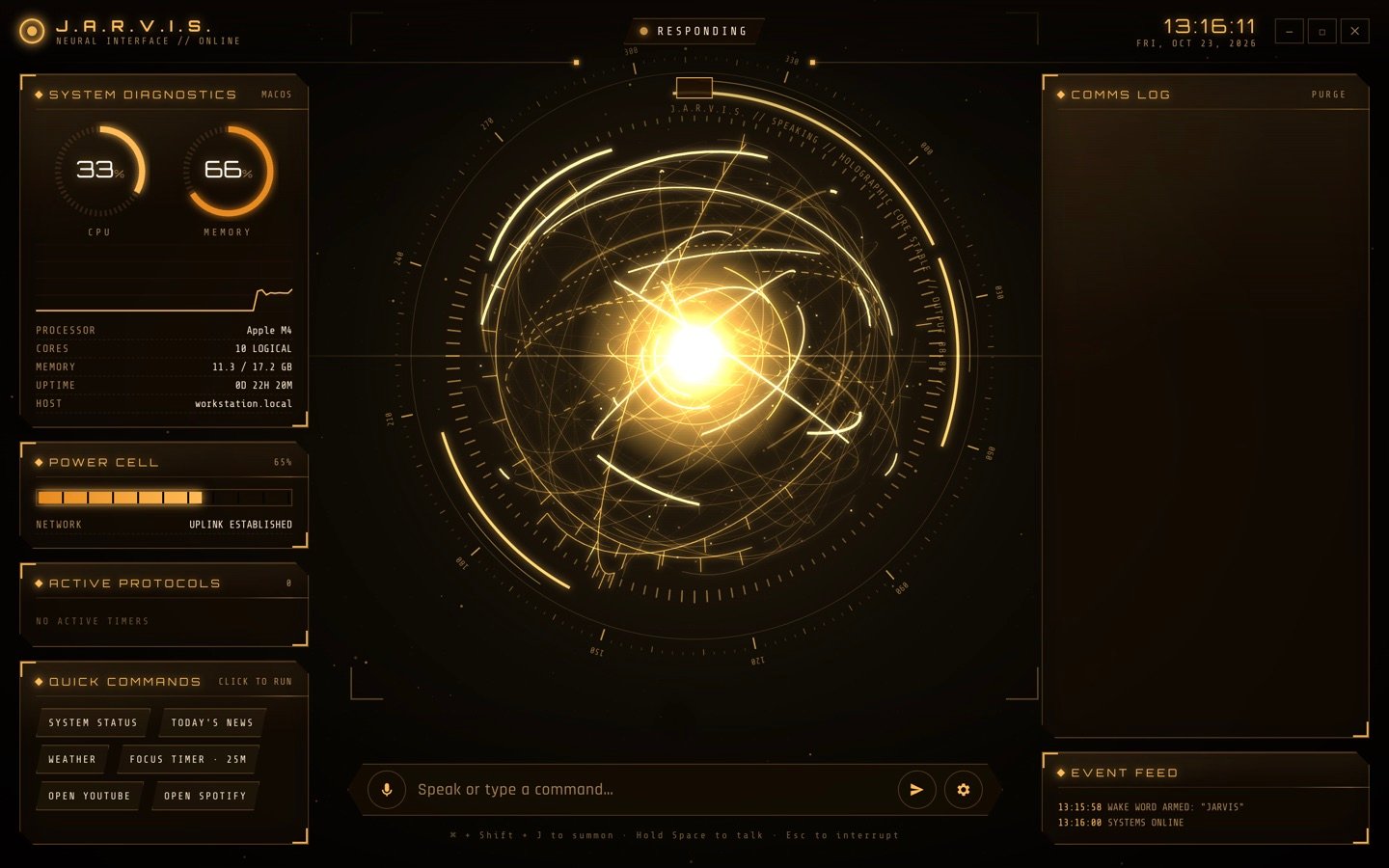
JARVIS is a voice-controlled AI assistant for your desktop, with a holographic HUD. Ask it a question, have it open an app or a website, set a timer or search the web, and it answers out loud.
- Free · no subscription
- macOS 12+ · Windows 10+
- Version 1.0.4
What it does
An assistant you talk to.
Private by design
Say “Jarvis” or “Hey Jarvis” from across the room, even with the window hidden. The wake word and your speech are both recognised on your computer with whisper.cpp, so your voice never leaves it.
Acts on your computer
Opens apps and websites, sets spoken timers, reports CPU and memory, and searches the web for current answers.
Natural voices
Replies are spoken by neural voices, including British ones, with your system voices as an offline fallback.
Always close by
Lives in your menu bar or system tray. Press ⌘/Ctrl + Shift + J, or on a Mac double-tap Caps Lock, to talk.
Download
Pick your computer.
Not sure which Mac you have? Open the Apple menu → About This Mac. “Apple M1” or later means Apple Silicon.
- SHA-256 JARVIS-1.0.4-mac-apple-silicon.dmg · 6a574a0aec80027ef512d816b7342389f23d363c794d32bcf9463909eac9a27b
- SHA-256 JARVIS-1.0.4-mac-intel.dmg · e728d5b2d27eebc7f945a9ca9fd23968b9882a35b10ab380c2c14c8cb09152c9
- SHA-256 JARVIS-1.0.4-windows-setup.exe · 33885803f331af51461c56a60d0ef5cb740d397f9789a1f874caec8e3e12b34b
Setup
Running in five minutes.
JARVIS isn't from the App Store or Microsoft Store, so your computer asks you to confirm the first time you open it.
- STEP 1
Install
Mac: open the .dmg and drag JARVIS to Applications. Windows: run the installer.
1 MINUTE - STEP 2
Allow it to open
Mac: if macOS blocks it, open System Settings → Privacy & Security and click Open Anyway. Windows: on the SmartScreen prompt, click More info → Run anyway.
1 MINUTE - STEP 3
Add a Groq key
Create a free API key at console.groq.com/keys and paste it into settings (the gear icon). Groq's free tier is plenty for everyday use.
2 MINUTES - STEP 4
Turn on voice
Allow the microphone. JARVIS downloads its speech model (575 MB) and its voice (320 MB) once, in the background. No account is needed for either.
1 MINUTE
Questions
Before you download.
Is JARVIS free?
Yes. The app is free, and both speech recognition and the neural voice run on your computer at no cost. The only outside service is Groq for the AI, which you sign up for yourself on its free tier.
Is it always listening?
Only for its name, and only on your computer. A small model listens for “Jarvis”, and whisper.cpp then transcribes your command on the device. Once its speech model has downloaded, usually a few minutes after first launch, no audio is uploaded. Until then, commands are transcribed by Groq. Only the text of your command goes to Groq for an answer. You can turn the wake word off in settings or from the menu bar icon.
Why does my computer warn me about it?
The app isn't signed with an Apple or Microsoft developer certificate, so your computer can't verify who made it. That's why it asks you to confirm the first time. You can check your download against the SHA-256 checksums above.
What permissions does it need?
The microphone, for voice commands. On a Mac, the double-tap Caps Lock shortcut also needs Input Monitoring, for a small helper called capswatch. It only watches the Caps Lock key. Everything else works without it.
Where are my API keys stored?
On your computer only, encrypted with your system keychain (macOS Keychain or Windows DPAPI). They're sent only to Groq when JARVIS answers you.
What's new
Release notes.
Download the latest version above; it installs over the old one and keeps your settings.
Version 1.0.4 · 24 October 2026
Puter is gone. JARVIS now speaks with Kokoro, a free neural voice that runs entirely on your computer, with no account or sign-in. Choose from British and American voices in settings. The voice (320 MB) downloads once, after the speech model. Until the speech model has downloaded, voice commands are transcribed by Groq on your existing key.
Version 1.0.3 · 24 October 2026
Speech recognition now uses Whisper large-v3-turbo, a much more accurate model that still runs free and fully on your computer. The new speech model (575 MB) downloads once after updating, and the old one is removed to free up space.
Version 1.0.2 · 23 October 2026
Speech recognition now runs on your computer with whisper.cpp, so your voice never leaves it and works offline. The speech model (190 MB) downloads once on first launch. Voice input no longer needs a Puter sign-in. Puter is now only used for the optional neural voices.
Version 1.0.1 · 23 October 2026
New: change the interface colour in settings, with six presets (Stark Gold, Arc Reactor, Mark III Red, Emerald, Vibranium, Ice) or any custom colour.
Version 1.0.0 · 23 October 2026
First public release: voice-controlled assistant with a holographic HUD, a "Hey Jarvis" wake word, neural voices, a menu bar mode and a Caps Lock double-tap shortcut on Mac.
JARVIS is an independent fan project made by Vivaan. It is not affiliated with, endorsed by or sponsored by Marvel Entertainment or The Walt Disney Company. Iron Man and J.A.R.V.I.S. are trademarks of Marvel.